| Type | Hobby game project. |
| Engine | Occam – Hadmade Hero inspired engine made from scratch. |
| Timeframe | Started summer of 2025. |
| Intent | Learn more about the building blocks of games and game engines. |
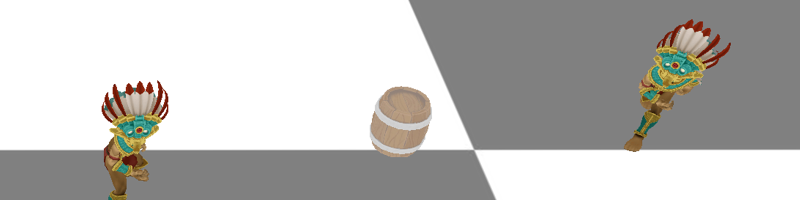
Table of Contents
- Intro
- Rollback Netcode
- DX12 Renderer (WIP)
- 2D Physics Simulation (WIP)
- Credits & Inspiration
Intro
Last year I got around to playing Animal Well and it was fantastic.
I later watched an interview with the creator Billy Basso on the architecture of the game. He mentioned being inspired by the video series Handmade Hero by Casey Muratori. I watched the first ~20 episodes of the series and was inspired to build a game from scratch as well.
Design Philosophy
- Building from scratch. I’m refraining from using packaged solutions as much as possible in order deepen my understanding of how it all works.
- Data oriented programming. Since my previous experience has all been object oriented I was inspired to expand my horizons and try a different approach.
- Game before engine. I want to practice game making, not just software architecture. This means my focus is building a game. All engine work must have a clear game purpose.
Engine Architecture
The basic architecture is the same as Handmade Hero, so if you want more in depth information I recommend checking out the series.
Most importantly, there is a separation between the platform and the game.
// This is the game from the perspective of the platform
// game_update is a function that takes a block of memory and player input as arguments.
struct win32_game_code {
    HMODULE GameCodeDLL;
    FILETIME DLLLastWriteTime;
    game_init *Init;
    game_update *Update; };
Platform
- Main executable file.
- Allocates one block of memory for the program to use as needed. This is the only memory allocation that the program ever does.
- Handles platform specifics like window and input.
- Provides services for the game like file read/write and debug print.
Game
- DLL (library) with functions like GameInit() and GameUpdate().
- Platform agnostic game code.
- Recieves input and memory from the platform.
In addition to simplifying potential new platform implementations, the separation enables some really cool features, almost out of the box:
- Hot reloading of game code - since the game doesn’t own any memory it can simply be reloaded at runtime comparing file write times.
- Save states/ replay system - we just feed stored state and input to the game. For the replay scenario the game update needs to be deterministic.
Rollback Netcode
Ever since the release Project Slippi back during the pandemic I’ve been interested in understanding Rollback Netcode.
Since I want to make a multiplayer game, I thought this would be a great opportunity to learn about in. Here’s a short overview based on my understanding from implementing it in my game.
How It Works (Why It Feels Good)
Rollback Netcode is a peer-to-peer networking model where mainly game input and frame sequence number is being transmitted.The remote- and local input is then used to simulate the game state locally.
struct network_input_message {
    uint64_t Frame;
    uint16_t ButtonsPressed;
    uint16_t ButtonsReleased; };
This all happens with a fixed, about 2-8 frame, input delay. The delay is based on the connection speed with the goal to receive the remote input in time to simulate the frame.
If remote input was not received in time, we do not wait to simulate the frame, but instead predict the remote input. This is the key to why Rollback Netcode feels so responsive.
As a player, there is consistency in the between input and feedback that can make it feel like you’re playing locally.
So what happens if we incorrectly guessed the remote input? You guessed it: we roll back. The state of the game is reset to where the incorrect guess occurred, and is then re-simulated up to the current frame.
Here are some visual examples. The left game does not send input messages while the background is red, resulting in the right game having to predict input.
Correct input prediction.Incorrect input prediction resulting in a (massive) rollback.
Prerequisites
As with everything, Rollback Netcode comes at a cost. The two main prerequisites for implementation are:
- Fast and deterministic game update loop - results produced from the game update need to be the same every time. This means deterministic game logic running at a fixed frame rate, quickly enough to run many iterations within the target frame time.
- The ability to quickly save and load game states - the mutable part of the game state needs to be small enough to quickly copy the data.
Implementation
This part assumes some familiarity with network APIs and protocols. For this project Winsock2 is being used to send messages between games using UDP.
Step 1: Synchronize Games
After making a connection we need to make sure that all games have the same starting game state for the simulation. This means that we need to consider the following aspects:
- Game State Synchronization - all games need to begin the simulation with the same game state. If there is no support for sending the state over the network, both states need to be initialized locally before input can start being sent.
- Clock Synchronization - in order for all games to get remote input delivered in time to simlate the current frame, we need to make sure that games simulate the same frame and the same time. Even if our game is running at a fixed frame rate, we cannot soly rely on the this fact to keep synchronized. Different machines could be running at slightly different speeds, or there could be lag that sets one of the games back. If games are out of sync, they need to subtly adjust the simulation speed to get in sync. If one game is way ahead it needs to pause simulation to wait for the slower game to catch up.
Here are some extracts from my synchronization implementation:
// Reset the game state and frame after a connection has been initialized.
CurrentFrame = 0;
SetGameState(InitialState);
int FrameDelta = CurrentFrame - Net->RemoteConnection.Frame;

// Use data from last received package to prevent speed adjustment
// in case of package loss
int TargetDeviationAtLastRecieve = (Net->FrameDeltaAtLastReceive - Net->FrameDeltaTarget);

// Calculate max- and target frame deltas from  RTT (round trip time)
if(FrameDelta > MaxFrameDelta)
{
    PauseSimulation = true;
}
else if(abs(TargetDeviationAtLastRecieve) > FRAME_DELTA_MARGIN)
{
    // Subtly adjust the simulation speed up or down as needed, depending on sign of delta.
    float SpeedAdjustmentPerFrame = 0.01f;
    FrameWaitMultiplier = 1.0f + TargetDeviationAtLastRecieve * 0.01f;
}
Step 2: Send and Receive Input
Sending the input is relatively straight forward. We just need to keep a few things in mind:
- Send Only Input Changes - we don’t need to inform the remote user that a button was not pressed. Likewise, we don’t need to communicate that a button is being held. Simply inform on what buttons have been pressed and released. A pressed button that was not released is held.
// Using a bit field for buttons keeps net package size low.
buttons ButtonStateDelta = Controller->ButtonState ^ Controller->OldButtonState;
if (ButtonStateDelta != buttons::none)
{
    network_input_message InputMessage = {};
    InputMessage.ButtonsPressed = ButtonStateDelta & Controller->ButtonState;
    InputMessage.ButtonsReleased = ButtonStateDelta & ~Controller->ButtonState;
}
- Use Acknowledgements (ACKs) - inform the other user of the current local frame number, along with the last remote frame number received. We need to keep sending input until we get an ACK that the input has been received, since lost input results in a desynchronization between games.
Step 3: Handle Missing Input
If we are missing remote input for the frame to be simulated, we first of all need to save the current game state. Since we will be guessing about what the remote player is doing, we need to be able to revert back to the last confirmed shared game state.
Then we need to predict. This part is actually really simple: We predict that the input will be the same as the previous frame. This is true most of the time. Unless you’re playing certain mini games in Mario Party, frames where a button is actually pressed or released are the exception.
Once we get the input missing input we need to compare it with our prediction. If they’re the identical, all good. But if they differ we need to load our saved state and resimulate all frames up until the current one. It could be that we have received some input, but not all leading up to the current frame. In this case we can save a new confirmed shared state and redo the prediction from there.
Using a circular buffer to keep track of input is a great way to handle the data.
// Example of flow while in the state of input prediction.
while (CurrentPredictionFrame <= CurrentGameLogicFrame)
{
    // Get current index in circular buffer and increment prediction frame
    CurrentPredictionFrameIndex = CurrentPredictionFrame % INPUT_BUFFER_SIZE;

    game_controller_input *CurrentInput =
        &InputBuffer[CurrentPredictionFrameIndex].Controllers[RemoteControllerIndex];
    game_controller_input *PreviousInput =
        &InputBuffer[PreviousPredictionFrameIndex].Controllers[RemoteControllerIndex];

    // Input prediction if the remote input has not been received.
    if (CurrentPredictionFrame > Net->RemoteConnection.Frame)
    {
        *CurrentInput = *PreviousInput;
    }

    // Simulate the frame.
    Game.Update(&Thread, &GameMemory, &InputBuffer[CurrentPredictionFrameIndex]);

    // Record a new game state if this is the latest frame of received remote input.
    if (CurrentPredictionFrame == Net->RemoteConnection.Frame)
    {
        Net->FirstPredictionFrame = CurrentPredictionFrame;
        RecordGameState(&State);
    }

    PreviousPredictionFrameIndex = CurrentPredictionFrameIndex;
    ++CurrentPredictionFrame;
}
Credits & inspiration
Interview with Billy Basso, creator of Animal Well.
Handmade Hero episodes, by Casey Muratori.
Great article on Rollback Netcode, by Infil.
Art assets from The Game Assembly’s Asset Library.